Introduction
Size in the text is the wrong place for size
Most attempts at this problem put the size in the prompt: large breasts, huge bust, and so on. That approach fails in three structural ways.
- The words leak into everything else. A caption heavy on size vocabulary drags the whole composition with it: body type, clothing fit, framing, even the subject's apparent age.
- The scale is not calibrated. "Large" means something different in every checkpoint and every prompt.
- It cannot be continuous. Text gives you a few coarse buckets, not a value you nudge.
This LoRA moves the control out of the text and into geometry. The size lives in a condition image: a black frame with one or two #FADBAE markers, where the marker's area fraction is the dial. The caption is then free to describe only the scene, and the model reads the geometry separately from the language.
The practical result is that size becomes a number you can measure and repeat, without ever typing a size word.
| You change | It controls |
|---|---|
| Marker area (% of frame) | Size class, the dial |
| Marker position | Where it sits in frame |
| Marker angle | Tilt |
| Marker count, 1 or 2 | Single marker or pair |
| Marker shape | Circle or ellipse aspect |
Calibration
Six classes, measured rather than guessed
The boundaries come from a labelled dataset: the per-class median total marker area as a fraction of the frame. Those six numbers are exactly the canvas preset buttons, so one click lands on a class the LoRA has actually seen.
- flat1.49%
- small2.94%
- medium3.22%
- large7.18%
- huge13.95%
- gigantic16.50%
Note the shape of the ladder: small to medium is a narrow step, while medium to large to huge opens up fast. That is the measured distribution, and it is why eyeballing the size is a poor substitute for setting the area. Intermediate values are legitimate too, because the dial is continuous.
Keep the marker in-distribution
The LoRA was trained on one marker style, so three rules keep you inside it: the background stays black (no gradients, no textures, no other content); the fill stays bright, #FADBAE by default; and there are one or two ellipses whose area is the size. Overlapping markers merge as a union, not a sum, which is the behaviour the training data had.
The condition image is forced to the target's exact pixel size when you connect an image to the node. This matters, because the pipeline bucket-crops the reference and a size mismatch silently displaces the markers.
Training Details
Two stages, structure first then detail
Fill in before publishing
The structure below is final. The bracketed values are the only numbers that could not be verified from the repository; everything outside the brackets is checked against the code and the shipped workflow.
Stage 1: [resolution] pretraining. Trained on a [N]-pair subset of the labelled breast-size dataset, with captions generated on the scene only and no size wording, which forces the size signal into the condition image instead of the text. A constant learning rate of [LR] establishes the area to class mapping.
Stage 2: [resolution] refinement. Continued training at higher resolution, focused on detail reconstruction at the marker boundary: edges, thin structures and fine geometry. The schedule switches to cosine for more stable convergence.
| Stage 1 | [res], [N] pairs, scene-only captions, constant LR [LR] |
| Stage 2 | [res] refinement, cosine LR schedule |
| Total epochs | [N]+ |
| Base model | Krea2, turbo LoRA rank 64 |
| Condition | _bd marker image |
| Caption rule | scene only, no size words |
Usage
Five steps from install to sample
This LoRA must be used together with the EditUtils plugin. It will not work as intended without it.
- Install the pluginComfyUI-EditUtils, plus Comfyui-LoraUtils for the LoRA merge nodes used in the example.
- Load the LoRA
breasts_control_lrzjason_20261015.safetensorsat strength 1.0, merged on top of the Krea2 turbo LoRA. - Draw the controlAdd
BreastSizeControl_EditUtils, drag one or two markers, and hit the preset button for the size you want. Connect a target image to force the exact output size. - Write the scene prompt onlySubject, clothing, framing, light. No size words, or the text competes with the geometry.
- Sample
euler / simple, 8 steps, CFG 1.0, denoise 1.0.
| Drag | empty space creates a marker, max two; the body moves it |
| Edge handles | set rx / ry independently, which is how a circle becomes an ellipse |
| Corner / wheel | uniform scale, stays a circle; Shift + edge drag for uniform too |
| Rotation handle | rotate the marker, or type an exact angle |
| Presets | the six measured class areas |
| Guide | dims the connected image underneath for placement, never touches the output |
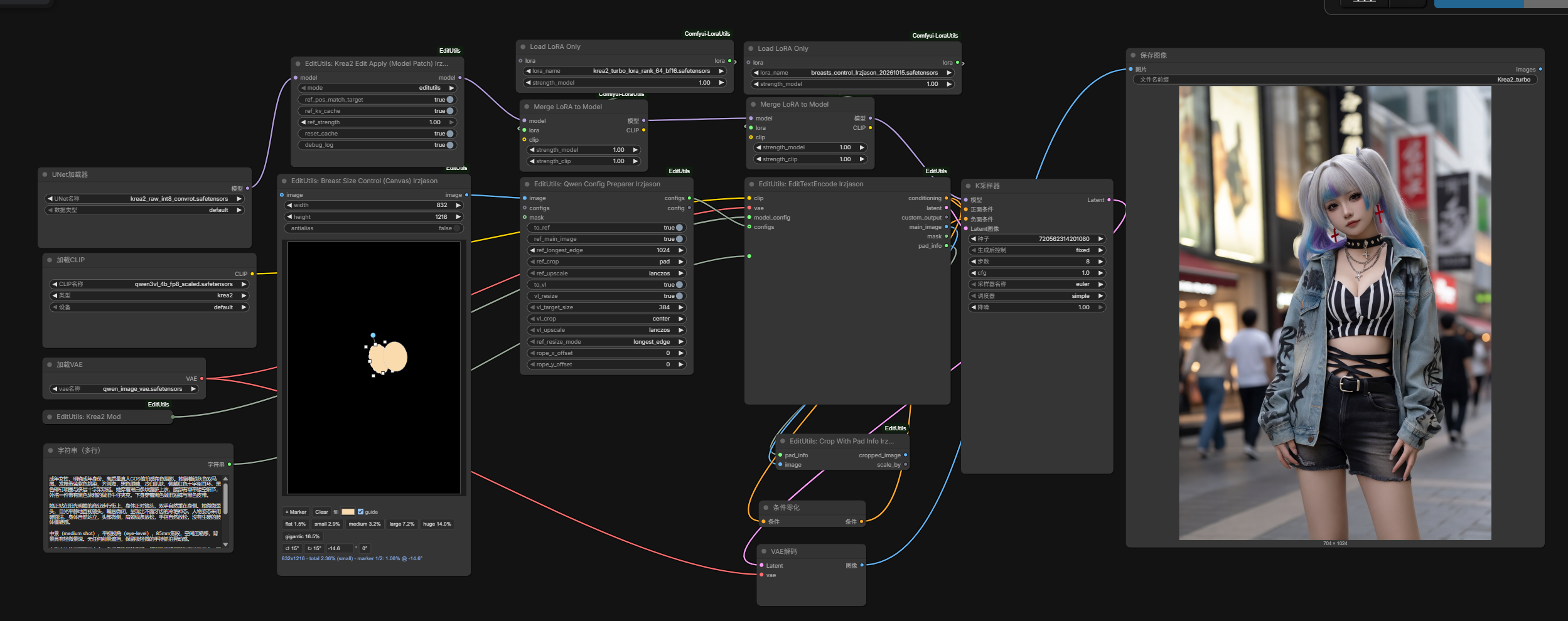
Wiring, from k2 breasts size control.json
UNETLoader (krea2_raw_int8_convrot)
  -> Krea2EditApply
  -> [Merge LoRA: krea2_turbo_lora_rank_64_bf16]
  -> [Merge LoRA: breasts_control_lrzjason_20261015]
  -> KSampler -> VAEDecode -> SaveImage

CLIPLoader (qwen3vl_4b_fp8_scaled, type krea2) --+
VAELoader  (qwen_image_vae)                      --+
Krea2ModelConfig                                  --+--> EditTextEncode_EditUtils --> positive + latent
PrimitiveStringMultiline (scene prompt)         --+                                  |
BreastSizeControl -> QwenConfigPreparer --------+                                  +--> ConditioningZeroOut --> negative
| Node | Purpose |
|---|---|
| BreastSizeControl_EditUtils | The canvas. Draws the _bd condition image that acts as the reference. This is the dial. |
| Krea2ModelConfig_EditUtils | Krea2 model config, model_name="qwen" route, vae_unit=8, built-in instruction. |
| QwenConfigPreparer_EditUtils | Wraps the condition image as the reference: ref_longest_edge=1024, ref_crop=pad, to_vl, vl_target_size=384. |
| EditTextEncode_EditUtils | Encodes prompt and reference into the conditioning, the sampling latent and pad_info. |
| Krea2EditApply_EditUtils | Patches the model so the reference latent is injected: ref_pos_match_target, ref_kv_cache=1, ref_strength=1.0. |
Model files: krea2_raw_int8_convrot.safetensors (UNET), qwen3vl_4b_fp8_scaled.safetensors (CLIP, type krea2), qwen_image_vae.safetensors (VAE).
Notes
Things worth knowing before you run it
- 01The caption rule is not a suggestion. If you put size words in the prompt, the text and the reference image compete for the same variable and the result drifts. Keep the text scene-only and let the geometry speak.
- 02Higher-resolution inputs yield richer marker geometry, since the marker's edge is where the extra detail lands.
- 03The area is the dial, not a rendering. The condition image is a control signal, not a target to be drawn literally.
- 04Works best with long, descriptive scene captions, consistent with the dataset side, where captions were written scene-only.
- 05Overlapping markers merge by union, so two crossing ellipses are not twice the size.
- 06This control LoRA and the Krea2 edit path are still in development. Results depend on the LoRA checkpoint and
ref_strength.
RH Workflow
Try it without installing anything
The RunningHub workflow runs the same graph in the browser. Bring your own scene prompt and drag the markers.
Intended for responsible, adult-only creative work involving adult subjects.
Contact
- Twitter / X@Lrzjason
- Emaillrzjason@gmail.com
- QQ Group866612947
- WeChat IDfkdeai
- CivitAIxiaozhijason